How to Make an AI Zombie Video: Two Photos, One Film
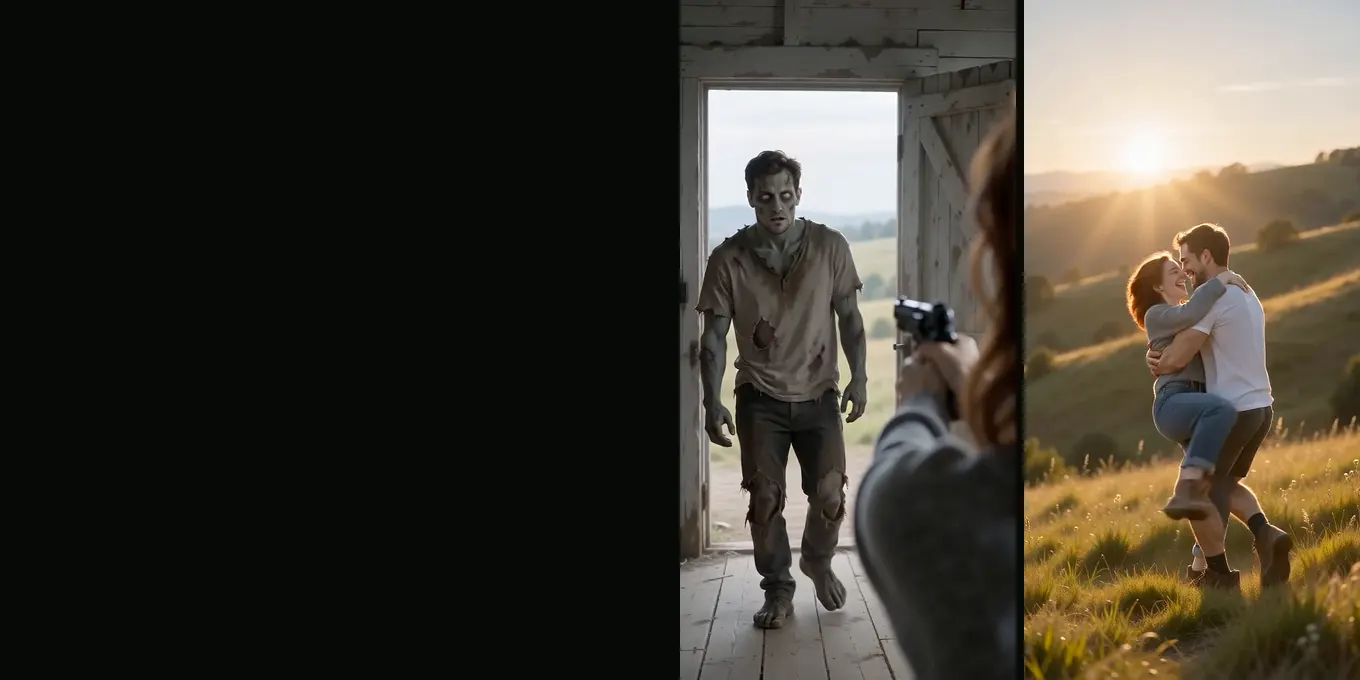
To do the AI zombie trend here, add two photos to the generator. The left photo is the survivor, the one holding the gun. The right photo is the one who turned: a person, or your dog or cat. Press the button and you get a 15-second zombie trend film with sound. It opens on a standoff (in an empty farmhouse, or one of four other worlds you can pick), the gun drops to the floor, the zombie leaps, and the leap lands as a hug in a sunny meadow.
At the settings the generator starts on (Seedance 2.0 Mini, 720p, 16:9) one film costs 12 credits. There is no free trial or free preview. The smallest pack is 12 credits for $9.99, and a render that fails gives its credits back on its own. Every picture in this zombie trend guide is a frame from our own test renders of 8 and 9 October 2026. The woman, the man and the golden retriever in them were made with an image model, so no real person appears.
Updated
HOW-TO
Make an AI zombie video from two photos
- Left photo holds the gun
- Right photo turns
- 15 s with sound
How to do the AI zombie trend in four steps
- Pick two photos, one person per photo, facing the camera, chest up or closer. The left slot is marked “Holds the gun” and the right one “Turned”. If they go in the wrong way round, the round ⇄ button between them swaps them.
- Choose Couple or Pet, then where it happens. Couple means the one who turned is a person: a partner, a friend, a sister. Pet means it is your dog or cat, and you stay on the left with the gun. The world is Farmhouse, Fallen City, Blizzard, Empty Mall or Night Subway; it changes the standoff, not the price.
- Check the settings. The generator starts on Seedance 2.0 Mini at 720p and 16:9. Pick 9:16 for the zombie trend on TikTok, Reels or Shorts. The length is always 15 seconds, because the seven shots of the zombie trend are timed for it.
- Sign in with Google and press the button. The price is printed on it before you pay: 12 credits at the start settings, 6 at 480p. Our 19 test renders took 131 to 188 seconds; the provider quotes up to about 5 minutes. The film lands in My videos as an MP4 with no watermark.
You never type a prompt. The generator sends the same shot list for every zombie trend film and puts your two photos into it as the two characters. If you want to read it, the AI zombie trend prompt guide prints it word for word.
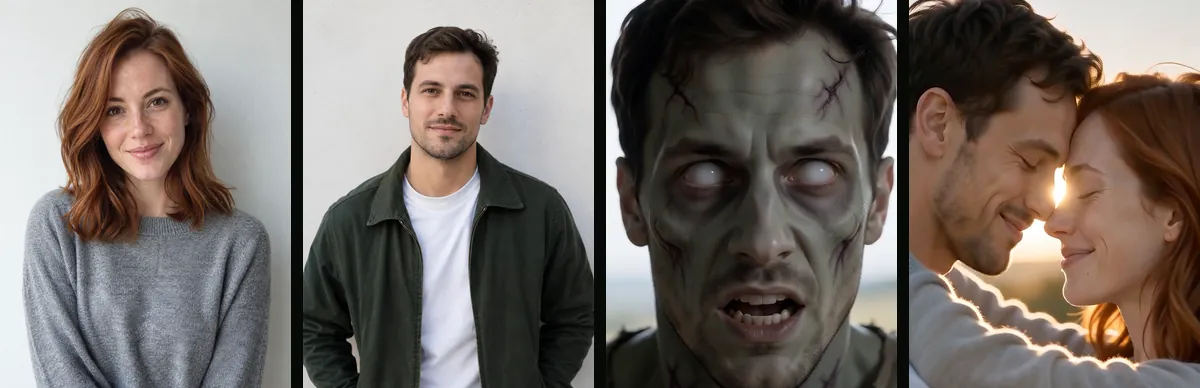
The frame below shows what goes into the zombie trend and what comes out: the two photos we uploaded on the left, then the man from the right photo as a zombie in the farmhouse and as himself in the meadow.
Try it
Make your AI zombie trend video
Left photo holds the gun, right photo turns. The price is on the button: 12 credits at 720p.
Your two photos
Left: the one holding the gun. Right: the one who turned. One person per photo.
Who has turned
Where it happens
Video
Ready in about 2 to 5 minutes. A failed render returns its credits. See prices
What the finished zombie trend video shows
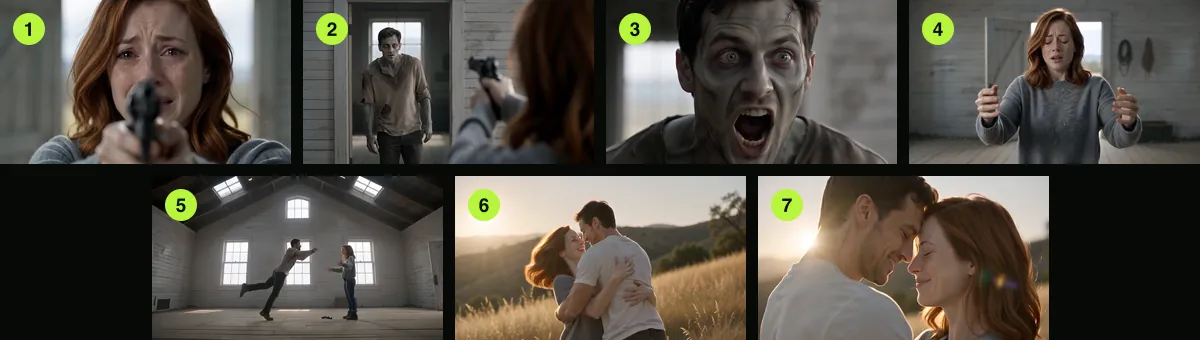
The zombie trend film has two parts and seven shots. Part one is the standoff, in a bare farmhouse room unless you pick another world. Part two is a memory in a hillside meadow, where both of them look the way they did before. These are the times the prompt asks for:
| Shot | Time | What happens |
|---|---|---|
| 1 | 0 to 2 s | Close on the survivor’s wet eyes above the raised gun |
| 2 | 2 to 4 s | Over the survivor’s shoulder, the one who turned comes through the doorway |
| 3 | 4 to 5 s | Tight on the turned face: grey skin, clouded eyes, a low snarl |
| 4 | 5 to 7 s | The survivor lets the gun drop to the floor and opens both arms |
| 5 | 7 to 9 s | Wide side-on shot: the leap, held in mid-air |
| 6 | 9 to 12 s | The leap carries into the meadow and lands as a hug and a spin |
| 7 | 12 to 15 s | Close two-shot, foreheads almost touching, sun flare between them |
In our three zombie trend renders of 9 October every shot came in that order, but the leap arrived about a second and a half late, so the meadow ran for about four and a half seconds instead of six. The sound follows the story: wind, shaky breathing, one growl and the thud of the gun in the farmhouse, then a soft piano theme and quiet laughter in the meadow. Nobody speaks, so there is nothing to translate. The frames below are the seven shots of our 16:9 render of 9 October.
AI zombie trend photos that keep both faces
The zombie trend prompt asks the model to keep each face and hairstyle exactly as in the photos and to ignore the backgrounds. So the face is what matters. A kitchen, a beach or a white wall behind it makes no difference.
| Your photo | What it does to the film | Use instead |
|---|---|---|
| Two people in one photo | The generator needs one face per slot, so it has to guess which face you meant | Crop the photo into two, one face each |
| Sunglasses, a cap or hair over the eyes | The zombie close-up changes the eyes, and there is less face to keep | Uncovered eyes, even light |
| A full-length shot from far away | The face is small, and shots 1, 3 and 7 are close-ups | Chest up or closer |
| A strong beauty filter or cartoon avatar | The film is photoreal and has less real detail to follow | An ordinary photo |
| Smaller than 300 px on a side | The generator refuses it | The original from your camera roll |
JPG, PNG, WebP and iPhone HEIC photos all work, up to 25 MB each. Very tall or very wide crops are refused; crop closer to the person. The outfit is a different story: the prompt keeps faces and hair, not clothes. In our renders the survivor still wore the grey sweater from her photo, while the man who turned got a torn, dusty shirt in the farmhouse and a white T-shirt in the meadow.
16:9 or 9:16: frame the AI zombie trend for where you post
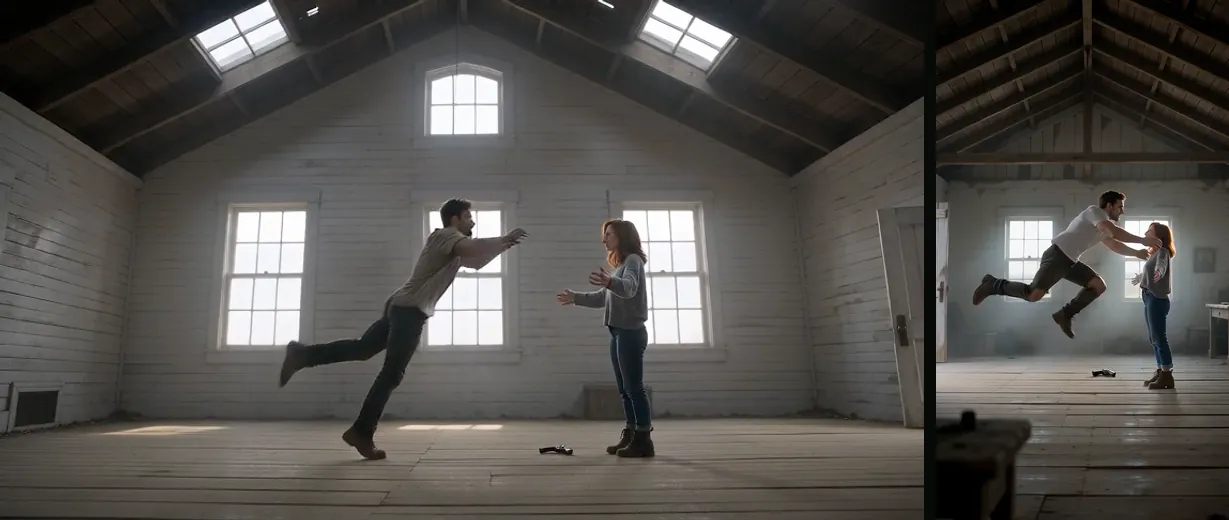
The generator renders 16:9, 9:16, 1:1, 4:3, 3:4 and 21:9, and the frame does not change the price. Pick 16:9 for YouTube or a big screen, 9:16 to fill a phone for TikTok, Reels and Shorts. The zombie trend story is the same in both. The frames below are the same moment, the leap in the farmhouse, from our 16:9 and 9:16 renders of 9 October.
Tall frames get one extra sentence in the prompt that keeps both bodies small and full length during the leap. Our first 9:16 render, before that sentence existed, jumped to the meadow a second and a half early.
Check your AI zombie trend video before you post it
Watch the whole zombie trend film once with the sound on. These are the moments to look at:
- Shot 1 and shot 4: is the survivor’s face yours, and clean, with tears and no zombie marks?
- Shot 3: does the zombie close-up still read as the person or pet in the right photo?
- Shot 4 and 5: does the gun land on the floor and stay there?
- Shot 6: does the leap carry into the meadow, and is there no gun in the grass?
- Shot 7: do both faces look like the photos?
Two things we saw in our own zombie trend renders and could not fully prompt away: the leap comes a little late, and in the wide shot of the leap the one who turned can already look healthy. If a face drifts, try a sharper, more direct photo for that slot. A new render is a new film, not a repair of the old one, and it costs credits again. If a render fails outright, the credits return to your balance automatically. Here is our 16:9 zombie trend render of 9 October to compare yours with:
Before you share your zombie trend video
Only use photos of people who said yes. Our terms ask for that, and for a parent or guardian's consent for anyone under 18. Say the zombie trend video is AI-made when you post it; TikTok, Instagram and YouTube all ask creators to label realistic AI video. The MP4 itself carries the video model's own "made with AI" label (C2PA) in its file data. Your uploaded photos are deleted 7 days after the render finishes; the film stays in My videos until you delete it.
FAQ
Do I need to write a prompt for the AI zombie trend?
No. You add two photos and pick Couple or Pet. The generator writes the shot list, the zombie look, the meadow and the sound into the prompt for you.
How long does an AI zombie trend video take to make?
Our 19 test renders took 131 to 188 seconds each, on Seedance 2.0 Mini at 480p and 720p. The provider quotes up to about 5 minutes. You can close the tab; the film waits in My videos.
How much does one AI zombie trend video cost?
12 credits at 720p and 6 at 480p on Seedance 2.0 Mini, for the full 15 seconds. There is no free trial or free preview. The smallest pack is 12 credits for $9.99, and a render that fails gives its credits back on its own.
Can I do the zombie trend on my phone?
Yes. The generator runs in the phone browser, takes photos straight from the camera roll (HEIC included) and downloads the MP4 to the phone.
Can I use one photo of both of us?
Not for the zombie trend film. The generator asks for two photos, one person (or pet) in each. Crop a photo of the two of you into two photos, one face each.
Is there a watermark on the zombie trend video?
No. You download the full film as an MP4 with no watermark. The file does carry an invisible "made with AI" label (C2PA) from the video model.
Sources
Read next
Zombie Love Story Video: How to Make the Couple Version
The couple version of the zombie trend: who turns, what each scene means, both versions, and ideas for anniversaries and friends
Zombie Pet Video: Turn Your Dog or Cat Into a Zombie
The zombie trend with your dog or cat as the one who turned: how it looks, the photos that work, and what we changed after our first dog test
AI Zombie Trend Prompt: Our Full Text and Four Fixes
The full AI zombie trend prompt, what each line does, and four fixes from our own test renders, with frames from each
Halloween Zombie Video Ideas for Couples, Friends and Pets
Seven Halloween zombie video ideas from two photos, with the cast, the frame, the cost and what to know before posting
AI Zombie is an independent site with no ties to TikTok or to any film or TV studio. Clips by other creators belong to them.